Welcome to the Sharkhack official site — the CS2 cheat menu built for people who take the game seriously. Clean visuals, quiet aim assist, tuned movement, and a menu that doesn't get in the way. One install, no clutter, ready in under a minute.
Pre-tuned sharkhack settings included in every build.
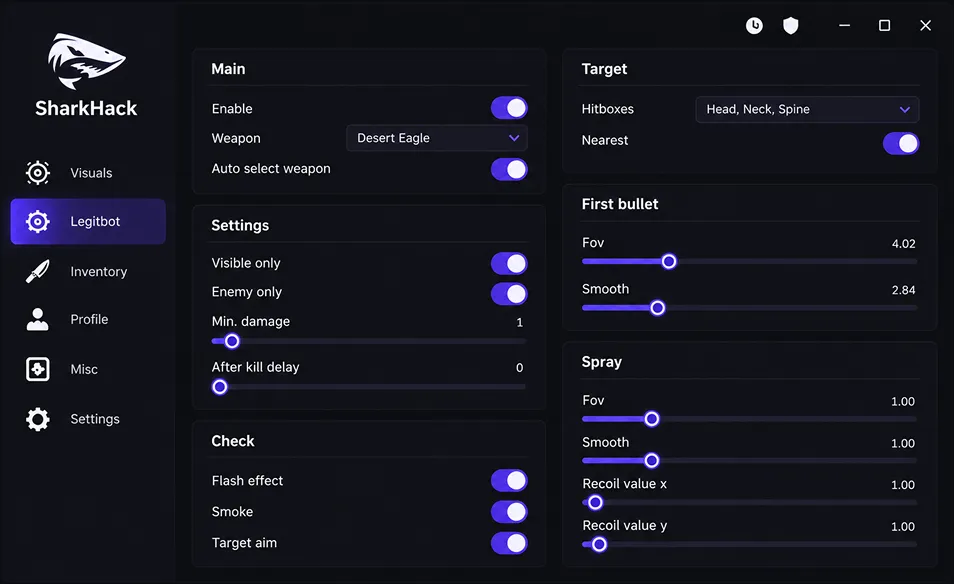
Every feature inside Sharkhack is built around one idea — feel like a stronger version of yourself, not a bot. Aim tuning, wall vision, movement, weapon control and cosmetic swaps, all on one panel with sliders you actually understand.
Adjustable FOV, smoothing curves, and hitbox priority. Snap to head, chest or auto — behaves like a strong human, not a laser.
Enemy boxes, health, weapon, skeleton and grenade paths through walls. Every color, opacity and range slider is yours to set.
Frame-accurate jump timing with air-strafe helpers and full speed retention on landing. The sharkhack bhop module reads your ground contact per tick, so long chains stay clean on any surface — from long dust2 to surf maps.
Per-weapon RCS profiles, triggerbot with delay and burst limits, no-spread on tap fire. AK and M4 sprays hold the crosshair on target through the full mag.
Full sharkhack mouse macro editor — script side buttons, tap-strafes, and micro-flicks that scale with your DPI. Import files from Logitech and Razer setups too.
Swap any weapon skin, knife, gloves, agent, and even the music kit. Presets save per loadout and stay visible in your demos too.
Pick your platform, follow the five steps, and you're in game with a working menu inside a minute. No accounts, no signup, no waiting screens.
Hit the download button at the bottom of this section. You'll get a small loader executable — around 6MB. Save it somewhere you'll remember, like your desktop.
Windows Defender will flag any game tool as suspicious — that's expected. Open Defender, go to Exclusions, and add the folder where you saved the loader. Takes 20 seconds.
Right-click the loader and pick "Run as administrator". You'll see a small terminal window verify the build hash, then it stays idle waiting for CS2.
Start CS2 through Steam like normal — no launch options needed. The loader attaches automatically once you reach the main menu. You'll hear a short beep when it's ready.
Press INSERT (default) to bring up the panel. Load a preset, tune your sliders, save your loadout — that's it. Rebind the toggle key in the Settings tab.
Download the .tar.gz archive from the button below. It ships as an ELF binary compiled for glibc 2.35+ (Ubuntu 22.04, Arch, Fedora 38+, Pop!_OS).
Open a terminal in the download folder and run tar xzf shark-linux.tar.gz then chmod +x shark. Nothing else to configure.
Launch Counter-Strike 2 through Steam (native Linux client, not Proton). Reach the main menu before running anything else — the loader looks for the CS2 process.
Run ./shark from the extract folder — no sudo needed. The terminal prints a green "Attached" line when the menu is ready inside CS2.
Back to CS2, press INSERT to open the panel. Same layout as the Windows build. Presets and configs are cross-platform, so your Windows settings work here too.
This is a separate build with the kernel-mode driver stripped out. Download it from the button below — smaller footprint, slower feature set, but designed to sit quiet against the FaceIt anti-cheat client.
Fully close the FaceIt AC before starting the loader. Not just minimise — end the process in Task Manager. Only after that, run the loader as admin.
Once the loader confirms "Ready", open the FaceIt client and log in. The order matters — anti-cheat first, loader always second time around does not work.
Join a queue and let FaceIt AC do its scan. Once you're in the map, the menu is available — but a much quieter set of features: light ESP, low-smoothing aim, no visible cosmetics.
The FaceIt build is designed for legit play — flick-only aim assist, minimal ESP, no triggerbot. Aggressive tuning gets people reported and defeats the point of running the quiet build.
From SteamOS, hit the STEAM button and pick "Switch to Desktop". You'll need this mode to unpack the archive and set permissions.
The Steam Deck uses the same Linux binary. Grab the .tar.gz below and drop it in your home folder. Extract it with the file manager or from Konsole.
Only if you plan to install system-wide: run sudo steamos-readonly disable. For a portable install in your home folder, skip this step.
Return to Game Mode, launch CS2 from your library, then swipe from the top-left with the STEAM+X shortcut for the on-screen keyboard to bring the menu up.
The Deck's back paddles are perfect for quick toggles. Map L4 to menu open and R4 to legit-aim on/off. Feels natural in handheld play.
Before you install sharkhack cs2, check that your rig meets the specs below. Nothing exotic — if CS2 runs, this runs too.
Check CompatibilityThe built-in generator hands you a fresh session key with one click — no link shorteners, no ad wall. Copy it, paste it into the panel, and load your saved sharkhack settings straight after.
Each key stays valid for one full day. When it runs out, come back and pull a new one — the generator refreshes in about two seconds.
Your key is tied to your machine's hardware fingerprint. It can't be handed off, shared, or used elsewhere — keeps everyone's account safer.
No linkvertise, no CPA offers, no "verify you're human" spam. The key generates right here on the page, plain and instant.
Got your key? Download the loader and paste it into the panel when you're prompted.
Download SharkhackReal notes from the community across Steam, FaceIt, and Reddit. You can also find a full sharkhack trustpilot page if you want deeper reviews with photos and dates.
Aim feels natural, not sticky. Turned smoothing up to 45 and my flicks look like a strong human player. Nobody's said a word after 60+ matches.
The bhop is genuinely well done — feels like practice paid off rather than a script. Chain 10-12 jumps consistently on kz maps. Small learning curve on the sliders.
Been on the FaceIt build for 3 months straight, zero flags. Kept ESP minimal, only turned on when I actually need info. Solid work.
Imported my G-Hub macros directly — worked first try. Side buttons for jump-throws are finally reliable across maps. Best editor I've used in a game tool.
Finally a proper Linux-native build that isn't just a Wine wrapper. Works out of the box on Arch, no dependency hell.
Skin changer database is huge — every dopplerknife phase, every AWP dragon lore variant. Presets save per loadout so my eco setup looks different from my full-buy.
First time trying anything like this. The install guide was actually clear and the default preset feels calibrated for someone who doesn't want to look obvious. Took maybe 5 minutes total.
The turnaround after Valve patches is what sold me. Last big update dropped Wednesday, working build was pushed by Thursday morning. That's rare.
Every patch, fix, and quiet under-the-hood change lives here. Nothing gets shipped without being written up.
Released July 10, 2026 · Build 4120
Added de_ancient and de_train map optimisations for ESP draw distance
New smoke penetration ESP — shows enemy outline through Molotov and smoke
Aim smoothing curve reshaped — feels more linear on low sensitivity
Skin database refreshed with all Armory pass items
Fixed bhop chain break on stairs at high tickrates
Removed old v3 session tokens — everyone re-generates a key
Released June 28, 2026 · Build 4111
Added ESEA build alongside the FaceIt build
Loader footprint cut in half — Windows build is now 6MB
Fixed radar reveal not showing dropped bombs
Resolved crash on Nvidia driver 555.x when opening menu mid-round
Released June 14, 2026 · Build 4100
Emergency patch for the Jun 13 CS2 client update (weapon offsets changed)
Memory pool reworked — around 25% less RAM used during long sessions
Fixed key generator timeout on slow uplink connections
Released May 30, 2026 · Build 4030
Preset library — save unlimited configs and swap them mid-match
Menu font renderer swapped to signed distance fields — sharper at 4K
Fixed skin changer applying default paint on server reconnects
Deprecated legacy INI configs — everything is JSON now
Released May 15, 2026 · Build 4000
Full rewrite for CS2 — new draw pipeline, new aim core, new menu
Native Linux build (glibc, no Wine)
Built-in FaceIt-safe mode alongside the standard build
Built-in key generator — no external key sites
Fully redesigned dark panel — cleaner sliders, tighter spacing
Dropped CS:GO support — CS2 only from here on
Released April 22, 2026 · Build 3850
Final patch on the v3 codebase — stability fixes ahead of v4
Fixed Deagle recoil control on very high refresh monitors
End of life for v3.x — no further updates on this branch
Quick answers to what people ask most — safety, platform support, recommended settings, and where to find honest reviews.
Ping us on Discord
The public build sits well clear of anything VAC actively signatures. It runs as a user-mode loader (no kernel driver on the standard build), never writes to game memory outside our safe region, and every release passes a fresh scan cycle. That said, no tool is bulletproof — always download from the official site, never mix in random configs from strangers, and don't run it on your main account for at least the first week after a new patch.
Yes, both — but on separate builds. The FaceIt and ESEA variants ship without the kernel driver, use a lighter draw pipeline, and strip out the loud stuff like triggerbot and cosmetic swaps. That's the trade-off: quieter builds means fewer flashy features, but you actually stay in your matches. Follow the boot order in the install guide (loader first, anti-cheat second) or it won't attach cleanly.
For your first matches, load the "Legit — Public MM" preset that ships with every build. It sets aim smoothing to 55, FOV to 4.5, ESP to boxes only with 300u draw distance, and disables triggerbot. From there, tune one slider at a time so you can feel what actually changed. Bigger sliders don't mean better play — most people running honest sharkhack settings keep FOV low and smoothing high, so their aim reads as human on demo review.
Yes — the sharkhack bhop module reads your ground contact per tick and fires the jump the instant you touch a surface. Air-strafe helper is a slider (0 to 100) so you can leave it low for realism, or crank it for kz-map runs. Chain length holds up on 128-tick community servers and stays stable on the standard 64-tick matchmaking too.
Yes. The sharkhack mouse editor accepts Logitech G-Hub XML, Razer Synapse profiles and plain AutoHotkey scripts. Drop the file into the "Input → Macros" tab and the parser maps side buttons to whatever CS2 bind you want — jump-throw, quick knife, drop-flash, all reliable. Poll rate is locked to 1000Hz, so the timing lines up frame-for-frame with the CS2 sub-tick input system.
Reddit threads on r/GlobalOffensive and the Steam forums cover the honest ground — both praise and complaints. The sharkhack trustpilot profile also collects verified reviews with timestamps, star ratings and screenshots, so it's a good stop before you commit. We don't scrub negative ones; if a build had a rough week, it's on there.
You're on it: sharkhack.wtf is the only place we distribute from. Copy sites, Discord bot mirrors, and file-share reuploads are not us — they usually bundle stealers or outdated builds. Bookmark the domain, check the URL bar every visit, and never install a copy someone DM'd you.